Windows 10 support ended on 14 October 2025. That single deadline pushed a lot of IT teams to re-examine how they deliver desktops in the first place, rather than just buying new hardware to run Windows 11. Virtual desktop infrastructure sits at the centre of that decision, because it changes where the OS actually runs and who is responsible for patching it.
The VDI market has also shifted structurally in the last two years. VMware’s EUC division was sold off and rebranded as Omnissa. Citrix went through a major private equity acquisition. Licensing models across the board have moved toward subscription and consumption-based pricing. None of this is cosmetic: it changes total cost of ownership, migration risk, and how many separate vendors you need for security.
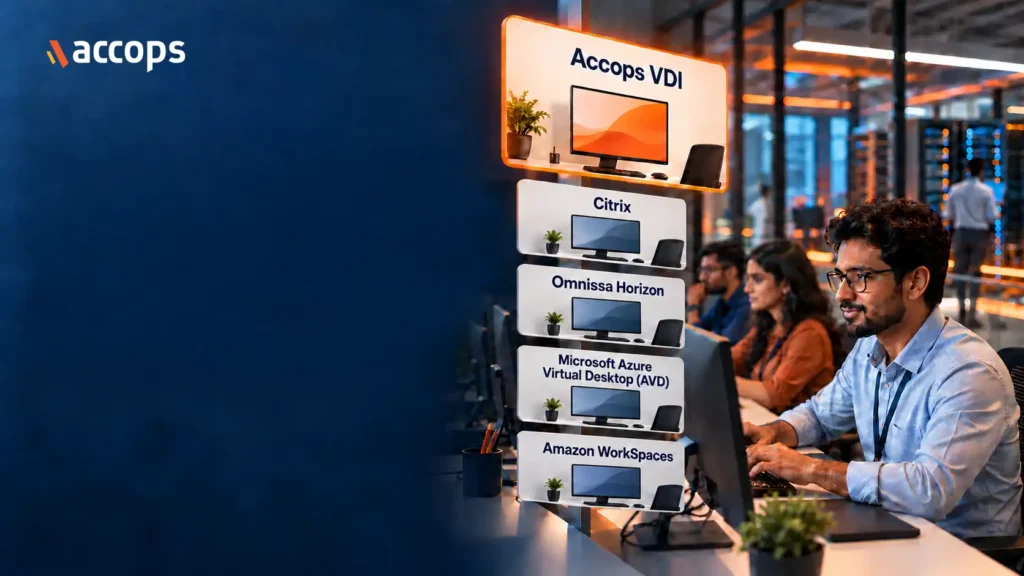
Below are 5 platforms IT teams are evaluating in 2026, starting with Accops VDI.
-
Accops VDI
Accops VDI is Accops’s virtual desktop and app delivery platform, running Windows and Linux desktops as persistent, non-persistent, shared, or personal instances. It supports Nutanix, VMware, Microsoft Hyper-V, Azure, Proxmox, Red Hat OpenShift/OpenStack, and HPE’s hypervisor, plus AWS, GCP, and OCI, with self-service provisioning so end users can request their own desktop without raising an IT ticket.
For workload performance, Accops VDI uses Photon, its own display protocol built to keep video and audio synchronised across the inconsistent networks common in hybrid work, such as home broadband or mobile connections. It’s aimed at multimedia-heavy and real-time collaboration workloads, where standard remoting protocols tend to introduce lag or audio drift. Profile management, user experience monitoring, and session recording are part of the core editions, which run from Bronze through Platinum, licensed as named-user or concurrent-user, on a perpetual or subscription basis.
Accops also builds its own ZTNA gateway (HySecure) and identity, MFA, and SSO engine (HyID) in-house. Both integrate directly with Accops VDI, and combine with it into the full Digital Workspace bundle for organisations that want VDI, secure access, and identity delivered together as one solution from a single vendor.
-
Citrix DaaS
Citrix DaaS (from Cloud Software Group) delivers virtual apps and desktops from the cloud with a centralised management console. It includes policy-based access control, multi-factor authentication, session recording, session watermarking, and TLS/SSL encrypted delivery, and integrates with StoreFront and the Citrix Workspace app. Citrix has also introduced Citrix Aidrien, an AI-powered assistant built into Citrix Cloud that lets admins query their DaaS and NetScaler environment in natural language and get answers sourced from Citrix’s own documentation and environment data.
It’s a mature platform with broad hypervisor and cloud support. Pricing is subscription-based, with tiers that vary by feature set, management level, and deployment model. Organisations already running Citrix infrastructure typically find it the path of least resistance, but layered secure access (equivalent to ZTNA) and identity features are managed as distinct components within the wider Citrix Platform rather than a single bundled licence.
-
Omnissa Horizon
Omnissa Horizon (formerly VMware Horizon, spun out of Broadcom’s EUC division and now owned by KKR) delivers virtual desktops and apps using Instant Clone technology for fast provisioning, App Volumes for real-time application delivery, and Dynamic Environment Manager for policy control. The Blast Extreme protocol is now the primary connection protocol; the legacy PCoIP protocol is being phased out of new Horizon releases.
Horizon runs on-premises on VMware vSphere or via Horizon Cloud on AWS, Azure, Google Cloud, IBM Cloud, and Oracle Cloud. It delivers the most value when paired with the wider VMware stack, since vCenter handles infrastructure management. Effective 4 May 2026, Omnissa raised list prices on Horizon licences, with a smaller increase for bundles that include VMware vSphere Foundation for VDI and a noticeably steeper one for bundles that don’t. The change applies only to new and expansion purchases; existing renewals are unaffected.
-
Microsoft Azure Virtual Desktop (AVD)
AVD is a cloud-native desktop and app virtualisation service running entirely on Azure. Microsoft manages the control plane; the customer manages the session host virtual machines. Microsoft states AVD is the only platform offering Windows 11 and Windows 10 Enterprise multi-session, which lets several users share one VM and reduces the number of virtual machines needed for a pooled desktop environment.
Pricing is consumption-based: organisations pay for the underlying Azure compute, storage, and networking by the second, with no separate AVD service fee for users already licensed for Microsoft 365 or Windows Enterprise. Identity runs through Microsoft Entra ID, with Active Directory sync common in hybrid environments. Because AVD is a PaaS offering rather than a packaged product, organisations without in-house Azure networking and identity expertise usually need a management layer or partner (Nerdio, Parallels RAS, or similar) on top of it to run day-to-day operations smoothly.
-
Amazon WorkSpaces
Amazon WorkSpaces is a fully managed DaaS offering from AWS, delivering persistent Windows or Linux desktops, with WorkSpaces Applications available separately for streaming individual apps rather than full desktops. It includes multi-factor authentication, single sign-on, IP-address-based access control groups, and integrates with AWS Directory Service or an organisation’s existing Active Directory.
Pricing is pay-as-you-go, based on bundles that combine compute and storage, and the platform includes the technical controls organisations typically need as part of a HIPAA or PCI DSS programme, such as encryption and access logging. WorkSpaces is a strong fit for organisations already standardised on AWS, since it shares identity, networking, and billing with the rest of the AWS estate. Outside an AWS-centric environment, it’s a narrower fit than platforms built to run across multiple hypervisors and clouds.
Three questions worth asking before you shortlist
- Is security bundled or a separate purchase? ZTNA, MFA, and SSO from the same vendor as your VDI, whether bundled or offered as an add-on, means fewer consoles and support contracts for your team to manage.
- Does it lock you into one hypervisor or cloud? Horizon delivers the most value inside VMware; AVD is Azure-only. Others are built to run across all of them.
- How is it licensed, and does that fit your capex or opex plan? Perpetual, subscription, and consumption-based pricing behave very differently at renewal time.
Choosing the right fit
Once security and licensing are ruled in or out, the two things that actually decide a shortlist are Linux support and migration effort. If part of your user base doesn’t need Windows, a VDI solution with native Linux desktops avoids Microsoft CAL costs entirely, something worth checking against each vendor’s own documentation rather than assuming.
Migration timelines are the other place vendor quotes diverge from reality. Ask any shortlisted vendor to run a pilot with your actual profiles, images, and access policies before signing, not a generic demo environment. A platform that looks fastest to deploy on paper isn’t always the one that’s fastest to deploy with your data.
Frequently Asked Questions
No. VDI describes the underlying architecture: virtual desktops hosted centrally and streamed to a device. DaaS describes the consumption model: the provider manages the infrastructure and sells it as a service. Most platforms in this list offer both on-premises VDI and a DaaS variant.
Yes, and for many organisations it's more relevant now. Centralising desktops means OS and application patching happens once, at the datacentre or cloud level, instead of across every endpoint individually, which matters when a support deadline forces an OS migration across the whole fleet at once.
Named-user, concurrent-user, and consumption-based (pay-per-use) models are all common, and most vendors now offer at least two of the three. The right model depends on how predictable your user count is and whether you prefer capex or opex