Summary
Virtual Desktop Infrastructure (VDI) is a desktop virtualization technology that runs operating systems, applications, and user desktops on centralized servers instead of local devices. It enables users to securely access their virtual workspaces from any location while helping organizations improve data security, simplify IT management, reduce hardware dependency, and support modern hybrid work environments.
What Is VDI (Virtual Desktop Infrastructure)?
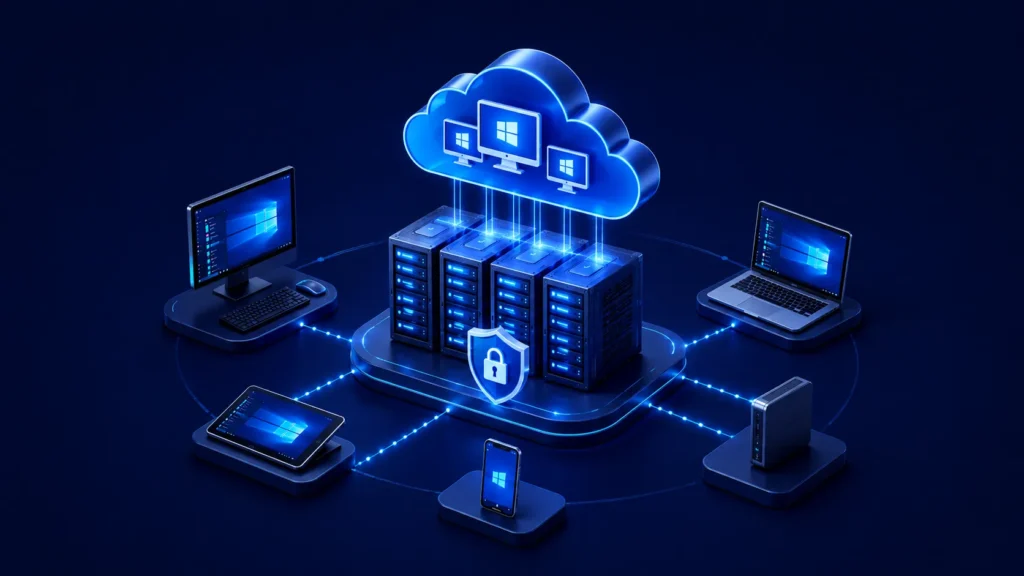
Virtual Desktop Infrastructure (VDI) is an enterprise computing architecture that centralises desktop operating systems, applications, and corporate data within data centres or cloud environments.
Rather than executing operating systems directly on local physical laptops or workstations, VDI runs these workloads on virtual machines managed on central servers. Users access their complete desktop environment remotely over secure network connections using endpoints such as thin clients, personal PCs, or mobile terminals.
How VDI Works
VDI decouples the user workspace from underlying endpoint hardware, shifting compute and data storage to central server infrastructure. The operational execution follows a structured sequence:
- Connection Initiation: An end user requests access via a software client or secure web interface on their client terminal.
- Authentication and Policy Verification: The connection broker authenticates user identity, checks directory permissions, and validates access policies.
- Session Allocation: The broker identifies an available virtual machine on the server hypervisor and assigns the session to the user.
- Encrypted Display Streaming: Server processors handle application execution and transmit screen display updates as encrypted pixel streams back to the endpoint.
- Real-Time Input Transmission: Keyboard, mouse, and touch inputs transmit back to the central server instantly, replicating a local PC experience.
Core VDI Architecture Explained
A resilient VDI ecosystem relies on several interconnected components working within the enterprise data centre:
-
Hypervisor:
The foundational software layer installed on physical host servers. It abstracts physical CPU, memory, and storage resources into isolated virtual machines that host individual user desktop sessions.
-
Connection Broker:
The intelligence layer of VDI. It routes incoming user connection requests, verifies credentials against corporate directory services, and manages active, idle, or disconnected desktop sessions.
-
Desktop Pools:
Logical groupings of virtual machines configured with identical software images tailored for specific enterprise job functions, such as finance, engineering, or customer support teams.
-
Provisioning Engine & Golden Images:
Automated systems that build, update, and deploy virtual desktops using standardised master templates (golden images), ensuring uniform OS and application configurations across the organisation.
-
Display Protocols:
Highly optimised network protocols (such as RDP, HDX, or PCoIP) that compress, encrypt, and deliver display graphics and audio downstream to the user, while sending user inputs upstream with minimal latency.
Why Businesses Use VDI
Enterprise IT teams face continuous pressure to manage hybrid workforces, maintain strict regulatory compliance, and control operating overhead. Distributed physical PCs introduce administrative complexity, as every device requires individual image maintenance, security patching, and troubleshooting.
VDI addresses these challenges by centralising desktop governance. It allows IT teams to enforce consistent security policies, protect intellectual property, and support bring-your-own-device (BYOD) programmes without exposing corporate systems to compromised hardware.
Key Benefits of VDI
-
Centralised Image Management:
System updates, security patches, and application deployments are applied once to a master golden image and propagated across thousands of user desktops instantly.
-
Enhanced Data Isolation:
Corporate data, financial ledgers, and trade secrets remain confined within central data centres, completely eliminating local endpoint data storage.
-
Extended Hardware Lifecycles:
Because compute processing occurs on central servers, organisations can repurpose ageing physical PCs or deploy low-power thin clients, deferring capital hardware replacement costs.
-
Location-Independent Productivity:
Employees access their complete personalised workspace securely from any authorised device or geographical location with stable network access.
VDI Use Cases
-
Remote and Hybrid Workforces:
Delivers secure access to internal applications for off-site staff without the expense of provisioning and shipping corporate laptops.
-
Task Workers and Shift Operations:
Enables high-density environments like call centres to use non-persistent desktop pools that automatically reset between shifts.
-
Contractor and Vendor Management:
Grants third parties temporary, isolated access to specific systems while blocking file downloads and lateral network movement.
-
Regulated Industries:
Helps healthcare, financial, and government entities comply with HIPAA, PCI-DSS, and GDPR standards by preventing local endpoint data persistence.
VDI vs. Traditional Physical Desktops
| Architectural Dimension | Traditional Physical PC | Virtual Desktop Infrastructure (VDI) |
| Compute & Processing | Local endpoint CPU and RAM | Centralised server hypervisor |
| Data Storage | Local hard drives or SSDs | Secure central storage / SAN arrays |
| Patch & Image Management | Distributed across every individual PC | Centralised via master golden images |
| Hardware Refresh Cycles | Rigid 3 to 5 year hardware replacement | Extended utility via thin clients |
| Data Security Posture | Vulnerable to endpoint theft and loss | Zero local data persistence |
VDI vs. Desktop as a Service (DaaS)
While both technologies deliver virtualised desktops, their infrastructure hosting and operational management models differ:
-
Virtual Desktop Infrastructure (VDI):
Typically deployed on-premises or within private cloud environments managed directly by internal enterprise IT staff. It offers complete customisation, total control over data sovereignty, and deep integration with legacy network assets, but requires upfront capital investment in server hardware and virtualisation licensing.
-
Desktop as a Service (DaaS):
A cloud-native model where a DaaS provider hosts and manages the underlying virtualisation infrastructure to deliver Desktop as a Service environments over the internet. Subscriptions operate on an operational expenditure (OpEx) model, offering rapid global scalability and lower initial setup effort, though with reduced direct control over core infrastructure layers compared to self-managed VDI deployments.
Security Benefits of VDI
Physical endpoints operating outside corporate network perimeters represent a primary cyber attack vector. VDI mitigates these risks through central enforcement mechanisms:
-
Elimination of Local Data Persistence:
If an endpoint terminal is lost, stolen, or infected with malware, corporate files remain protected because sensitive data was never stored on the physical device.
-
Accelerated Vulnerability Patching:
IT security teams remediate operating system vulnerabilities centrally across golden images, eliminating the threat window created by delayed endpoint patching.
-
Granular Session Policy Enforcement:
Session policies strictly control or disable peripheral redirection, preventing unauthorised users from copying corporate files to USB drives, taking local screen captures, or printing files.
-
Centralised Threat Auditing:
Security Operations Centre (SOC) teams monitor desktop access logs, authentication events, and user activity from a single administrative plane.
Challenges and Operational Considerations
While legacy VDI setups required heavy planning, modern architectures and deployment models resolve these traditional hurdles:
-
Capital Expenditure:
On-premises hardware requirements can be offset by adopting hybrid cloud models, reusing existing PCs as thin clients, or leveraging converged infrastructure to keep costs predictable.
-
Network Latency:
Enterprise protocols, traffic compression, and bandwidth optimisation ensure smooth session performance, even across low-bandwidth or remote connections.
-
Storage IOPS and Boot Storms:
Temporary logon spikes during shift starts are eliminated using intelligent caching, flash storage, and non-persistent desktop pooling.
-
Management Complexity:
Unified digital workspace platforms consolidate connection brokering, access gateways, and desktop management into a single console, eliminating the need for dedicated virtualisation teams.
Is VDI Right for Your Organisation?
VDI is the ideal architecture for organisations, branches, or specific departments where centralising data and standardising compute environments is paramount. It is the most effective solution for:
- High-Compliance Departments: Finance, HR, R&D, and legal teams handling sensitive data or intellectual property.
- Shift-Based & High-Density Environments: Contact centres, customer support teams, and training labs using shared terminals.
- Distributed Workforces & Third Parties: Remote employees, outsourced teams, and contractors who require access to corporate systems without company-issued hardware.
For departments or organisations with lighter computing requirements, full desktop virtualisation may not always be necessary. In these scenarios, robust workspace security can be achieved through Zero Trust Network Access (ZTNA) gateways, Identity & Access Management (IAM), and secure application publishing.
This modular approach ensures every department gets the exact level of access control and security it requires without unnecessary infrastructure overhead.
Conclusion
Virtual Desktop Infrastructure shifts workspace governance from fragmented physical endpoints to a centralized execution environment. By separating desktop processing from underlying hardware, organizations strengthen their security posture, streamline IT administration, and lower long-term infrastructure expenditures.
Modern Digital Workspace Solution, such as Accops, build upon core VDI principles by integrating connection brokering, secure access gateways, and endpoint control into unified VDI solutions that simplify virtual workspace management for enterprise IT teams.
Frequently Asked Questions
Persistent VDI retains user personalisations, settings, and installed applications across sessions. Non-persistent VDI assigns a temporary desktop from a shared pool that automatically resets to a pristine baseline image upon logout, purging temporary files and user modifications.
Yes. Because processing and memory workloads run on central servers, endpoints act primarily as display terminals. Organisations can repurpose legacy PCs or deploy low-power thin clients without degrading end-user application performance.
VDI centralises data storage inside protected data centres or cloud environments. Encrypted protocols transmit display pixels to endpoints, preventing sensitive files from resting on local physical drives where they could be stolen or copied.
Standard VDI streams sessions in real time over an active network connection. However, modern display protocols are heavily optimised for resilience, maintaining stable session state and smooth user experience even across variable, low-bandwidth, or fluctuating mobile network connections.