Summary
Desktop as a service is a cloud computing offering where a service provider delivers virtual desktops to end users over the internet, typically licensed through a subscription. This model allows organisations to outsource the backend management of their virtual desktop infrastructure to a third party, ensuring secure access to applications and data from any location. By adopting this approach, businesses can eliminate high upfront hardware costs and provide their workforce with a flexible, scalable, and highly secure digital workspace.
Introduction
The global shift towards hybrid work and the increasing sophistication of cyber threats have made the traditional office-bound desktop model nearly obsolete.
As we move through 2026, desktop as a service has emerged as the cornerstone of digital transformation for enterprises worldwide.
Recent industry data suggests that the DaaS market continues to see robust growth, with a significant percentage of organisations moving away from on-premises VDI to cloud-hosted alternatives to gain better agility and resilience.
This guide explores the mechanics, benefits, and strategic importance of desktop as a service in the modern era. Whether you are a CIO looking to reduce capital expenditure or an IT manager seeking to simplify endpoint management, understanding how desktop as a service works is essential for maintaining a competitive business environment.
By the end of this article, you will understand why this turnkey solution is the preferred choice for consolidating remote access infrastructure.
What is Desktop as a Service (DaaS)?
At its core, desktop as a service is a cloud-hosted virtualisation solution. It is important to distinguish this from traditional Virtual Desktop Infrastructure (VDI); while VDI requires an organisation to manage its own servers, storage, and networking in-house, DaaS provides a fully managed environment where the service provider handles the deployment and maintenance of the underlying infrastructure.
This allows the customer to focus purely on managing their desktop images and applications rather than the physical hardware.
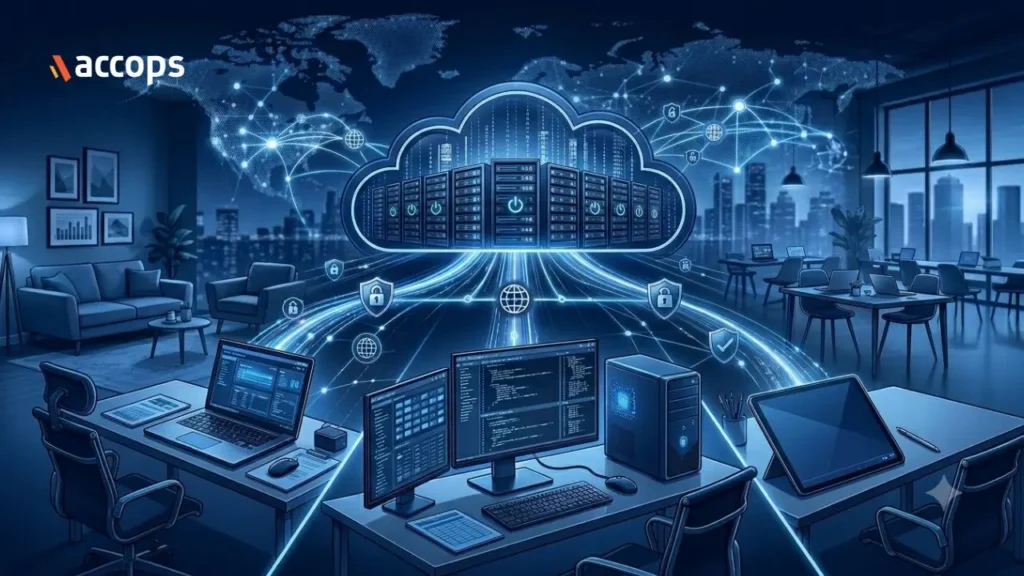
In a desktop as a service model, the virtual desktop resides in a secure data center. Users access their personalized desktops via a web browser or a dedicated client application on various devices, including laptops, tablets, and thin clients. This decoupling of the operating system from the hardware is what provides the flexibility needed for today’s mobile workforce.
How Does Desktop as a Service Work?
The mechanics of desktop as a service rely on a multi-tenant or dedicated architecture hosted by a provider. The process involves several interconnected layers:
- Infrastructure Hosting: The provider hosts the virtual machines on high-performance servers in the cloud.
- The Control Plane: This is the management layer where IT administrators configure policies, provision new desktops, and monitor user sessions.
- Streaming Protocols: Advanced protocols are used to stream the desktop interface from the cloud to the user’s device, ensuring a responsive experience even for high-definition tasks.
- Security and Connectivity: Secure gateways and Zero Trust principles ensure that only authorised users on validated devices can connect to the virtual environment.
Key Features of Desktop as a Service
Modern desktop as a service platforms go beyond simple desktop delivery. A robust solution unifies several critical functions into a single platform:
- Integrated Security: Combining ZTNA, Multi-Factor Authentication, and data loss prevention to protect sensitive corporate information.
- Device Posture Validation: Ensuring that a user’s device meets specific security criteria, such as having an active antivirus, before granting access.
- Flexible Deployment Models: Options for multi-tenant control planes for standardisation or dedicated control planes for deep customisation.
- Peripheral Redirection: The ability to use local hardware like printers, scanners, and webcams within the virtual session.
Benefits of Desktop as a Service (DaaS )
Transitioning to a desktop as a service model provides several strategic advantages:
- Zero CapEx Model: Organisations can shift from a capital-heavy model to a pay-as-you-go consumption model, eliminating the need for massive upfront investments.
- Operational Efficiency: It significantly reduces the burden on IT teams by automating infrastructure refreshes and simplifying software distribution.
- Enhanced Security: By centralising data in the cloud rather than on individual devices, the risk of data theft from lost or stolen laptops is virtually eliminated.
- On-Demand Scaling: Businesses can quickly scale up their virtual workforce during peak demands and scale down just as easily to optimise costs.
An Accops Case Study: A Financial Services Firm
A financial services firm focused on accounting and advisory transitioned to a desktop as a service model to solve their remote access challenges. With staff frequently handling sensitive client tax data and financial audits, the organisation needed a way to ensure that no data was ever stored on personal or portable devices.
To increase credibility and provide a verifiable benchmark, it is noted that this firm deployed the Accops DaaS product as their core solution.
By adopting a DaaS strategy, the firm provided its accountants with secure access to their specialised financial software from any location, facilitating a seamless transition to a work-from-home model during a global crisis.
This centralised approach ensured that all document processing occurred within a secure cloud environment, fulfilling strict regulatory compliance requirements.
According to the Accops case study, this transformation helped the firm achieve a 70% reduction in attrition rates and significant savings on office rent while reinforcing client trust through granular, policy-based access controls.
Common Use Cases of DaaS
The versatility of desktop as a service makes it suitable for various business scenarios:
- Remote and Hybrid Work: Providing a consistent and secure office-like experience for employees working from home.
- Contractor and Third-Party Access: Giving temporary workers secure access to specific applications without providing them with company-owned hardware.
- Bring Your Own Device (BYOD): Allowing employees to use their personal laptops while corporate data remains isolated in the cloud.
- Business Continuity: Ensuring that operations can continue smoothly in the event of a physical office disruption or a local hardware failure.
Challenges and Limitations
While the benefits are significant, desktop as a service is not without its challenges:
- Internet Dependency: Because the desktop is cloud-hosted, a stable and high-speed internet connection is required for an optimal experience.
- Latency: Users in very remote locations may experience slight delays if they are far from the cloud data centre.
- Geopolitical Risks: Foreign-headquartered providers may suspend services to comply with their home-country sanctions, potentially resulting in a sudden loss of operational visibility. Choosing a provider with local jurisdiction and data residency is critical to mitigate these risks.
DaaS vs Traditional Desktop Environments
The primary difference between desktop as a service and traditional desktops lies in where the intelligence resides. In a traditional environment, the operating system and data live on the physical hard drive of a PC.
| Feature | Traditional Desktop | Desktop as a Service (DaaS) |
| Hardware | Fixed Physical PC / Laptop | Any Device (Thin Client, Tablet, PC) |
| Management | Individual device patching | Centralised image management |
| Data Storage | Local hard drive | Secure cloud storage |
| Cost Model | CapEx (High upfront cost) | OpEx (Monthly subscription) |
| Scalability | Slow (Manual hardware buy) | Instant (Software-defined) |
How to Choose the Right DaaS Provider
Selecting a desktop as a service provider requires a careful evaluation of several factors:
- Security Integration: Look for providers that offer built-in MFA and ZTNA rather than requiring third-party add-ons.
- Platform Support: Ensure the provider supports the operating systems and the cloud platforms your business uses.
- Support SLAs: Verify that the provider offers clear Service Level Agreements with rapid response times for critical issues.
- Customisation: Choose a platform that allows you to customise virtual desktop configurations based on different user personas.
Future of Desktop as a Service
Looking beyond 2026, the future of desktop as a service is tied to artificial intelligence and edge computing.
We expect to see DaaS platforms that use AI to predictively scale resources based on user behaviour and enhanced monitoring that identifies performance bottlenecks before a user even notices them.
Furthermore, the integration of 5G will mitigate current latency issues, making the cloud-hosted desktop feel even more like a local machine.
Conclusion
Desktop as a service has moved from being a niche technology to a fundamental requirement for the modern, agile enterprise. By consolidating VDI, ZTNA, and MFA into a single platform, organisations can achieve a level of security and operational efficiency that was previously unattainable.
Accops DaaS stands out as a turnkey, managed solution designed to simplify this transition. By offering a secure, unified platform with flexible deployment options and a transparent pay-as-you-go model, Accops enables businesses to eliminate CapEx and focus on growth.
With pricing starting from Rs. 1,333/- per user per month, you can contact our team at support@accops.com to schedule a live demo or to request a custom cost analysis tailored to your infrastructure requirements.
Frequently Asked Questions
It is a cloud computing solution where a service provider delivers virtual desktops to users via the internet on a subscription basis, managing all backend infrastructure.
A provider hosts virtual machines in a data centre and streams the desktop interface to a user’s device via secure protocols, allowing for remote management.
The key benefits include the elimination of upfront hardware costs, simplified IT management, enhanced security through Zero Trust architecture, and the ability to scale resources on demand.