Summary
Security Assertion Markup Language (SAML) enables applications to rely on a trusted identity provider for user authentication. SAML 2.0 is widely used for enterprise single sign-on (SSO) solution, but it does not replace application permissions, MFA policies or session management. These boundaries affect integration decisions.
An employee signs in through the company’s identity system and opens an expense application without entering another password. They then access the HR portal with the same sign-in session. Both trust the identity provider instead of checking the password.
But what about older web applications, desktop software and systems connected directly to Active Directory?
What Is SAML (Security Assertion Markup Language) and What Is SAML 2.0?
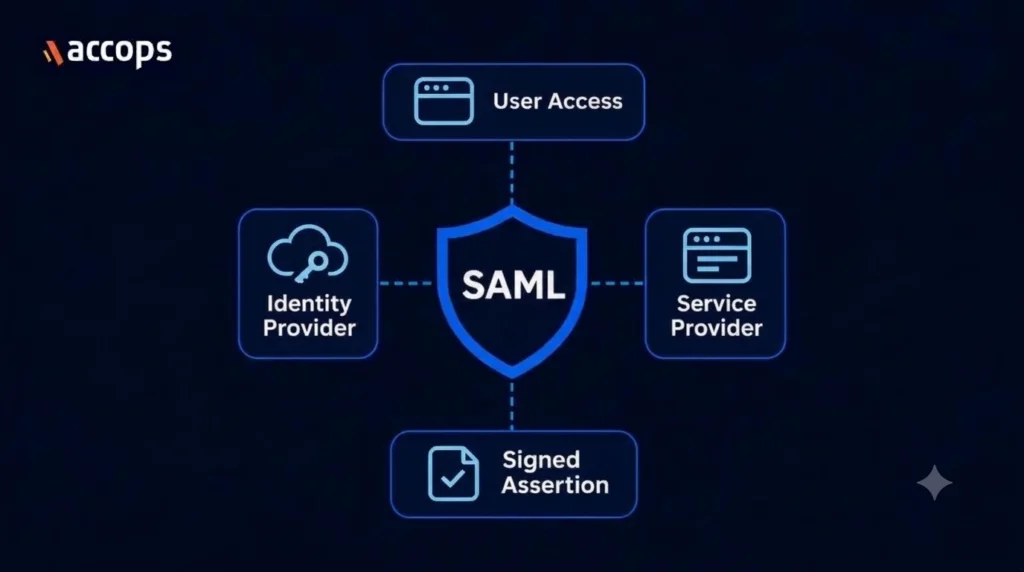
SAML is an XML-based standard developed by OASIS. It allows one system to send authentication information to another system that trusts it. This is identity federation.
Two parties are involved in a typical SAML login:
- Identity provider (IdP): Verifies the user’s identity and issues a SAML assertion.
- Service provider (SP): The application that checks the assertion before allowing the user to sign in.
SAML 2.0 defines assertion exchange, including browser-based SSO. It does not determine how users prove their identity. The IdP may use passwords, Multi-factor authentication (MFA) or other authentication methods according to its policy.
How Does SAML Authentication Work?
A common service-provider-initiated login follows five steps:
- Application request: An employee opens a SAML-enabled application without an active session.
- Redirect: The application sends the browser to its trusted IdP with a SAML authentication request.
- Identity verification: The IdP authenticates the employee, or uses an existing IdP session if policy allows.
- SAML response: The IdP returns a response containing an assertion, commonly through the browser to the application’s Assertion Consumer Service (ACS) endpoint.
- Application login: The SP validates the trusted signature and relevant details, including the issuer, intended recipient, validity period and request reference where applicable. It then creates its own session if access is permitted.
Users may instead start at an IdP portal. This IdP-initiated flow has no original SP request to match.
What Is a SAML Assertion and What Information Does It Contain?
A SAML assertion is an XML statement issued by a trusted authority. In an Single Sign-On (SSO) login, it typically conveys:
- Subject: An identifier for the user, often a NameID.
- Authentication statement: When the user authenticated and, if included, the authentication method or context.
- Attributes: Optional information such as department or group membership.
- Issuer and conditions: Who issued the assertion, which application may accept it and when it is valid.
The signed assertion, or the signed response containing it, must be validated as required by the SAML profile and integration. A signature helps establish integrity and origin; encryption, when used, protects confidentiality.
If an application matches accounts using email addresses, a name change may disrupt account mapping. Stable identifiers are preferable where supported.
How Is SAML Used in Enterprises?
Consider a finance team using an expense platform. A manager authenticates through the company IdP, then opens the platform with approval rights assigned to their account. An accounts-payable colleague signs in through the same IdP but sees a different set of functions. SAML confirms the sign-in; the application determines their permissions.
The organisation may also have three different application types:
- SAML-enabled SaaS or internal web apps: Can use direct SAML federation when correctly configured.
- Older web apps using AD/LDAP or local passwords: Need their own supported authentication method, application changes or a compatible gateway. They do not automatically understand SAML.
- Desktop or client-server apps: May require other authentication integrations rather than browser-based SAML SSO.
Inventory applications before rolling out SSO.
SAML vs SSO: What Is the Difference, and Can SAML Be Used for Authorisation?
SSO solution is the user experience of accessing multiple applications through one sign-in. SAML is a protocol that can provide that experience; it is not another authentication factor.
SAML also differs from OpenID Connect (OIDC). Both support federated sign-in. SAML commonly fits established enterprise web applications, while OIDC is often a practical choice for newer web and mobile applications using OAuth 2.0-based architecture.
Neither protocol is inherently more secure. Security depends on validation, IdP policy and authentication methods. Choose what the application securely supports.
SAML can carry attributes that an application uses when assigning roles. It also defines authorisation-decision statements. However, ordinary SAML SSO confirms authentication; the application still decides which resources and actions are allowed.
How to Implement SAML Authentication
Start by confirming which applications actually support SAML 2.0. Then:
- Configure trust: Exchange metadata and verify entity IDs, endpoints and signing certificates.
- Map accounts: Agree on the NameID and attributes used to match users with application accounts.
- Apply MFA policy: Configure MFA at the IdP according to the application’s risk. SAML does not require MFA by itself.
- Validate responses: Check signatures and the content they protect, intended audience, recipient, validity and request matching. Reject replayed assertions.
- Plan ongoing changes: Test certificate renewal, access removal and application-session expiry before going live.
Signature validation requires care. An application must use the same XML content that was verified, otherwise it can be exposed to attacks such as XML signature wrapping.
Accops HyID provides an example of supporting different application authentication methods within one identity solution. For SAML-enabled applications, HyID can act as the IdP, authenticate users against Active Directory or its native user directory, and request additional MFA when the relevant policy is configured. For applications using AD/LDAP directly, a separate HyID LDAP-proxy integration can add MFA. HyID supports on-premises, cloud and hybrid deployments. LDAP-proxy MFA does not, by itself, make a legacy application SAML-compatible.
Does SAML use cookies? Assertions are not carried in cookies, but browsers commonly use cookies for IdP and application sessions. Logging out of the IdP does not necessarily end application sessions.
Conclusion
SAML can standardise sign-in across applications that support federation, but enterprise access rarely depends on one protocol alone. A sound design starts with the application’s authentication capabilities and ends with clear ownership of account mapping, MFA requirements and access removal. That is what turns a convenient login into a manageable identity architecture.
Frequently Asked Questions
Yes. A SAML identity provider can verify users against Active Directory and issue assertions to compatible applications. Active Directory remains the identity source; the application relies on the IdP's authentication result rather than communicating with the directory directly.
Not necessarily. SAML enables trusted identity exchange, but security also depends on correct assertion validation, MFA policy and application controls. A poorly configured federation can introduce risks even when the underlying protocol is established and widely supported.
Disabling the employee at the IdP can prevent new federated logins. It may not immediately terminate existing sessions at connected applications. Organisations should also configure application deprovisioning, session expiry and, where supported, coordinated logout.