Summary
Desktop as a Service (DaaS) and Virtual Desktop Infrastructure (VDI) are both virtualisation-based solutions designed to deliver secure, remote access to corporate applications. As organisations move through 2026, the choice between these models has become a strategic necessity following the Windows 10 End-of-Life (EOL) deadline. This blog provides a detailed technical and operational comparison of DaaS vs VDI, analysing factors like management responsibility, cost structures, and infrastructure ownership, while helping IT leaders determine which solution best fits their hardware refresh and digital workspace objectives.
Introduction
The enterprise computing landscape is currently navigating a period of significant transition. With the October 2025 cessation of Windows 10 support, IT leaders in sectors like BFSI and Healthcare are facing a massive hardware refresh cycle to meet Windows 11 requirements.
As organisations evaluate their path forward, the DaaS vs VDI comparison remains the central theme of digital workspace transformation. While traditional Virtual Desktop Infrastructure (VDI) offers unparalleled control and can be deployed with extreme speed, Desktop as a Service (DaaS) provides the consumption-based agility required for today’s distributed workforce.
Understanding the technical difference between vdi and daas is essential for CIOs aiming to balance security, performance, and budget in a post-EOL world. According to recent market insights, the shift is less about choosing one technology over the other and more about selecting the right delivery model for specific business needs.
What Is VDI (Virtual Desktop Infrastructure)?
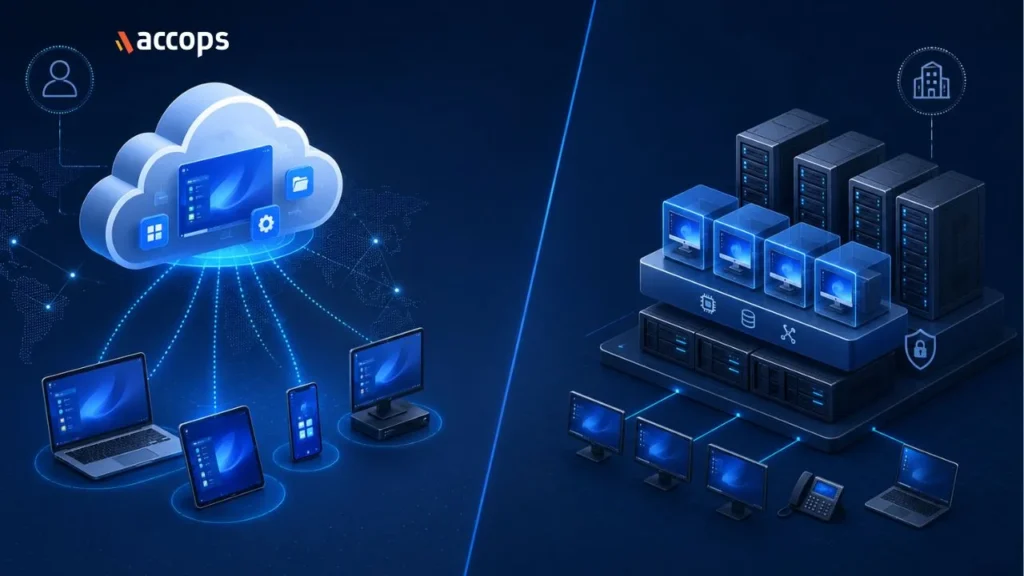
Virtual Desktop Infrastructure, or VDI, is a technology that uses virtual machines to provide and manage virtual desktops. In a traditional VDI setup, the desktops are hosted on centralised servers, which can be located in an organisation’s own data centre or a private cloud.
The organisation typically maintains oversight of the entire stack: the hardware, the software, and the hypervisor. VDI has long been the flagship choice for enterprises requiring high levels of customisation and data sovereignty, as all information remains within a controlled environment.
What Is DaaS (Desktop as a Service)?
Desktop as a Service (DaaS) is the cloud-hosted evolution of virtualisation. In this model, the service provider hosts the infrastructure and manages the complexities of the back-end, such as load balancing and networking. Users access their desktops over the internet through a subscription-based model.
DaaS removes the need for heavy upfront capital expenditure (CapEx) by shifting the cost to a predictable operational expense (OpEx). It is particularly effective for organisations needing to scale instantly across global regions without deploying local physical servers.
Difference Between VDI and DaaS
When evaluating desktop as a service vs vdi, the primary distinction lies in the management of the underlying physical infrastructure. In a VDI model, the organisation (or their managed service partner) oversees the physical hardware. In DaaS, you consume the service, while the provider ensures the hardware availability.
| Feature | VDI (Private/On-Prem) | DaaS (Public Cloud) |
| Hosting | Local or Private Cloud | Public/Provider Cloud |
| Infrastructure Management | In-house or Managed Service | Service Provider |
| Cost Model | CapEx (Upfront) | OpEx (Monthly/Yearly) |
| Scalability | High (Software-defined) | Instant (On-Demand) |
| Control | Granular and Deep | Standardised and Agile |
The difference between vdi and daas often comes down to the desired financial model. VDI allows for long-term cost stability on owned assets, whereas DaaS offers the flexibility to scale costs up or down based on monthly headcount.
Advantages and Disadvantages of VDI
-
Advantages
- Absolute Data Sovereignty: Ideal for highly regulated industries where data residency is a strict legal requirement.
-
- Cost Predictability: Once hardware is commissioned, there are no fluctuating monthly cloud consumption fees.
-
- Deep Customisation: Allows for complex integrations with legacy local applications that may not be cloud-ready.
Read More: Advantages of VDI
-
Disadvantages
- Hardware Procurement Cycles: While software deployment is near-instant, scaling VDI requires physical server capacity, which can be affected by global hardware supply chain delays.
-
- Infrastructure Overhead: Unless opting for a managed service, the internal team must oversee the physical maintenance of the data centre environment, including power and cooling.
Advantages and Disadvantages of DaaS
-
Advantages
- Zero Infrastructure Footprint: Deploy thousands of desktops without ever stepping into a data centre.
-
- Rapid Global Expansion: Spin up desktops in a new geographical region in minutes using the provider’s existing cloud nodes.
-
- Simplified Budgeting: Pay only for what you use, making it perfect for temporary contractors or seasonal projects.
-
Disadvantage
- Internet Dependency: User experience is directly tied to the quality of the public internet connection.
-
- Standardisation: Some managed DaaS platforms may offer less flexibility for highly bespoke hardware configurations compared to private VDI.
Case Study: The Strategic Shift in 2026
A recent “One Minute Insight” by Gartner Peer Community revealed that 63% of surveyed organisations now rely solely on Desktop as a Service (DaaS) to support their remote work requirements, successfully moving away from traditional VDI and VPN setups (Source: Gartner Peer Community, 2025). This shift highlights a growing preference for managed services that reduce the burden of backend infrastructure management.
In the broader market, as noted in general industry analysis by Deloitte and PwC, large-scale organisations, including those with contact centres exceeding 3,000 seats, have increasingly transitioned to managed desktop models to solve the “Windows 11 refresh wall.” By utilising cloud-hosted environments, these firms can repurpose existing hardware that lacks TPM 2.0 support, effectively extending the lifecycle of their current devices while maintaining modern security compliance.
DaaS vs VDI: Cost Comparison
The financial debate of DaaS vs VDI has shifted due to the 2026 RAM price volatility.
- VDI involves a higher initial investment but provides a lower Total Cost of Ownership (TCO) over a five to seven year period for a stable workforce.
- DaaS avoids the “hardware tax” and rising component costs by bundling everything into a single seat price. It eliminates the risk of over-provisioning, which is a common inefficiency when purchasing physical servers.
DaaS vs VDI: Use Cases
- BFSI: Uses VDI for core high-security banking systems and DaaS for the flexible, remote sales workforce.
- Healthcare: Employs DaaS to provide clinicians with seamless access to records across multiple facilities without local server clusters.
- Manufacturing: Relies on VDI for low-latency access to heavy design applications on the factory floor.
DaaS vs VDI: Security
The distinction in security between vdi and daas is narrowing. Traditionally, VDI was seen as the isolated choice. However, modern VDI solutions, such as those provided by Accops, are now fully consolidated, all-in-one platforms.
These combine VDI with Zero Trust Network Access (ZTNA) and Multi-Factor Authentication (MFA) to provide a security posture that is just as robust and integrated as any DaaS offering. Whether hosted on-premises or in the cloud, the focus in 2026 is on identity-centric security and device posture validation.
DaaS vs VDI: Which One Should You Choose?
The choice ultimately depends on your hardware refresh strategy. If your existing data centre is modern and you require absolute control, VDI is the logical path. If you are facing a massive endpoint refresh due to Windows 11 and want to shift to a flexible financial model, DaaS is the superior alternative.
Future Trends in DaaS and VDI
As we move further into 2026, the trend is toward “Unified Virtualisation.” Enterprises are increasingly seeking a single management plane that can broker both on-premises VDI and cloud-based DaaS. AI-driven analytics are also becoming standard, identifying performance bottlenecks in a user’s virtual session before the user even reports a lag.
The Accops Solution: Bridging the Gap
Accops provides a unified approach to the DaaS vs VDI dilemma. Our platform, Accops HyWorks, is an all-in-one solution that integrates VDI, ZTNA, and MFA into a single management console. This allows organisations to deploy VDI within hours or transition to a fully managed DaaS model without compromising on security or performance. By turning legacy hardware into secure gateways, Accops helps you navigate the Windows 11 transition while keeping your workforce productive and your data protected.
Conclusion
Navigating the choice between DaaS and VDI in 2026 demands a balance of financial pragmatism and technical foresight. Align your strategy with specific hardware refresh triggers and infrastructure goals by leveraging a unified access platform. If you are ready to transition to a flexible cloud model, partnering with a proven desktop as a service provider like Accops is the first step toward digital resilience. Explore our Accops DaaS offering to discover high-performance DaaS solution tailored to your enterprise needs.
Frequently Asked Questions
The primary difference is that VDI is typically hosted on-premises or in a private cloud managed by the organisation, whereas DaaS is a cloud-hosted service managed by a third-party provider.
DaaS is often preferred for remote work due to its ability to scale rapidly across different geographies and its pay-as-you-go model, though modern VDI can offer similar performance and security.
Yes. Both solutions allow you to repurpose legacy devices that may not meet the hardware requirements of Windows 11 by using them as gateways to a secure, high-performance virtual desktop.